
مخطط احتساب التكلفة
يساعدك تقرير مخطط احتساب التكلفة على عرض احتساب تكلفة صنف معيّن سواء عبر رمز الصنف أو اسم الصنف.
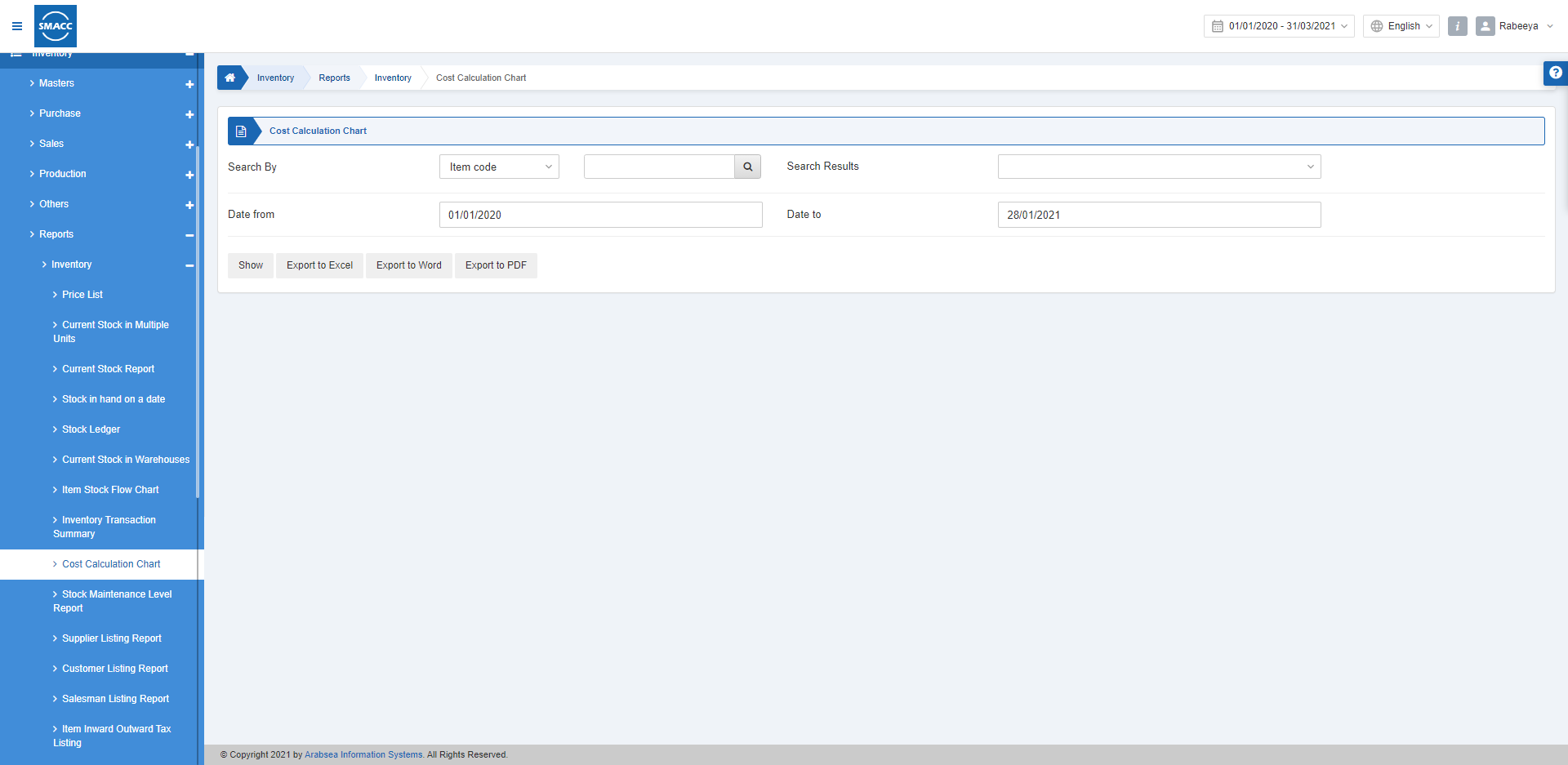
عرض مخطط احتساب التكلفة
لعرض تقرير احتساب التكلفة، انتقل إلى المخزون > التقارير > المخزون > مخطط احتساب التكلفة، فتظهر صفحة مخطط احتساب التكلفة. البحث حسب: اختر رمز الصنف أو اسم الصنف ثم انقر على أيقونة «بحث». نتائج البحث: يعرض هذا الحقل الصنف الذي تم البحث عنه.
التاريخ من: يحدّد هذا الحقل تاريخ بداية التقرير.
التاريخ إلى: يحدّد هذا الحقل تاريخ نهاية التقرير.
البحث حسب: اختر رمز الصنف أو اسم الصنف ثم انقر على أيقونة «بحث». نتائج البحث: يعرض هذا الحقل الصنف الذي تم البحث عنه.
التاريخ من: يحدّد هذا الحقل تاريخ بداية التقرير.
التاريخ إلى: يحدّد هذا الحقل تاريخ نهاية التقرير.
 «عرض»: يعرض هذا الزر التقرير وفقًا للمرشّحات المحددة.
«تصدير إلى Excel»: يتيح هذا الزر تصدير بيانات التقرير إلى Excel.
«تصدير إلى Word»: يتيح هذا الزر تصدير بيانات التقرير إلى Word.
«تصدير إلى PDF»: يتيح هذا الزر تصدير بيانات التقرير إلى PDF.
انقر على زر «عرض» لعرض التقرير.
«عرض»: يعرض هذا الزر التقرير وفقًا للمرشّحات المحددة.
«تصدير إلى Excel»: يتيح هذا الزر تصدير بيانات التقرير إلى Excel.
«تصدير إلى Word»: يتيح هذا الزر تصدير بيانات التقرير إلى Word.
«تصدير إلى PDF»: يتيح هذا الزر تصدير بيانات التقرير إلى PDF.
انقر على زر «عرض» لعرض التقرير.
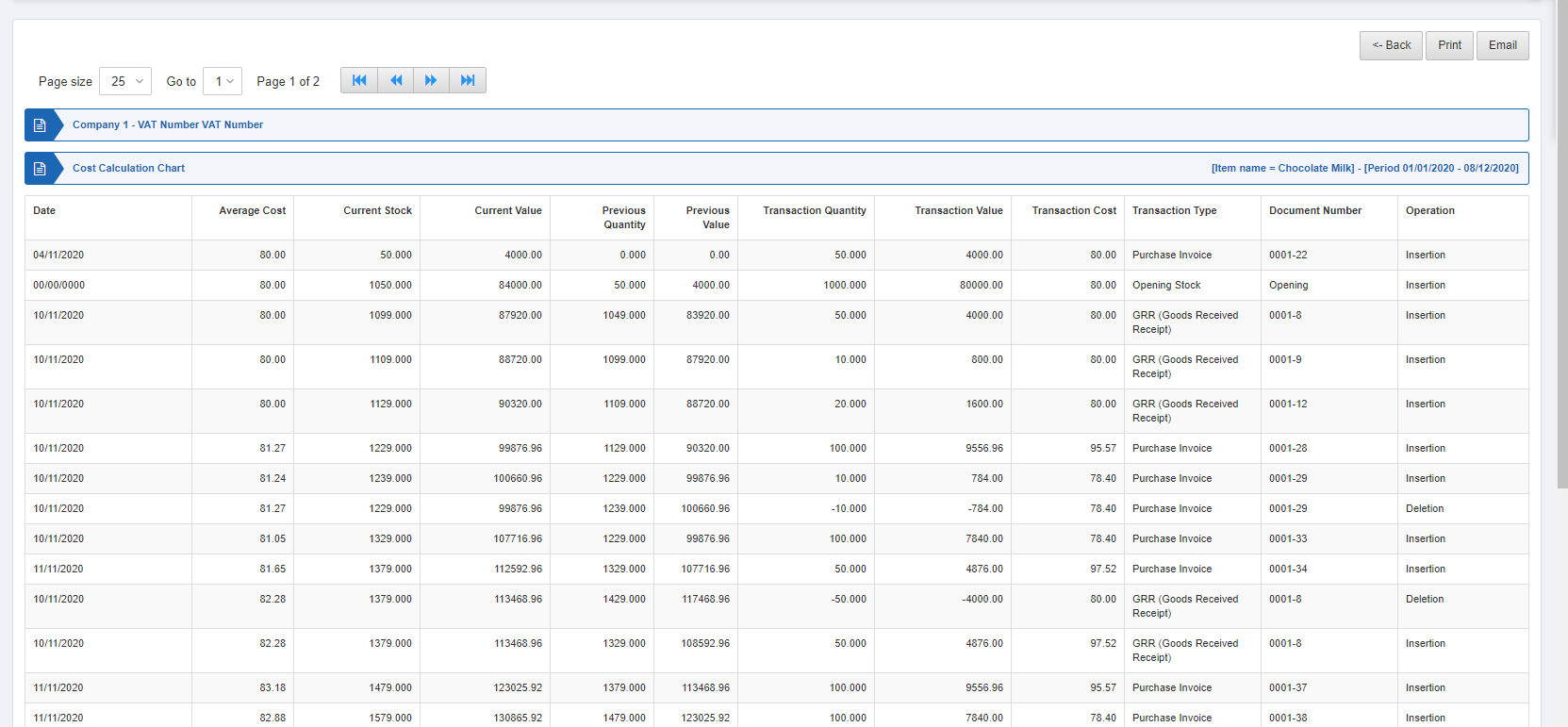 كما تتوفّر أزرار تنقّل للتنقل بين صفحات العرض.
 حجم الصفحة: يمكنك ضبط عدد القيود المعروضة في كل صفحة.
الانتقال إلى: يمكنك الانتقال إلى رقم الصفحة التي تريد عرضها.
حجم الصفحة: يمكنك ضبط عدد القيود المعروضة في كل صفحة.
الانتقال إلى: يمكنك الانتقال إلى رقم الصفحة التي تريد عرضها.
 يمكنك العودة إلى الصفحة السابقة أو طباعة التقرير أو إرساله عبر البريد الإلكتروني.
هل كان هذا المقال مفيداً؟
ابدأ مع SMACC اليوم
جرّب مجاناً لمدة 14 يوماً — بدون بطاقة ائتمان وبدون التزام.