
دفتر الأستاذ/الملخص
عرض تقرير دفتر الأستاذ/الملخص
انقر على «المحاسبة المالية»، ثم «التقارير»، ثم «مركز التكلفة»، ثم «دفتر الأستاذ/الملخص». ستظهر صفحة دفتر الأستاذ/الملخص.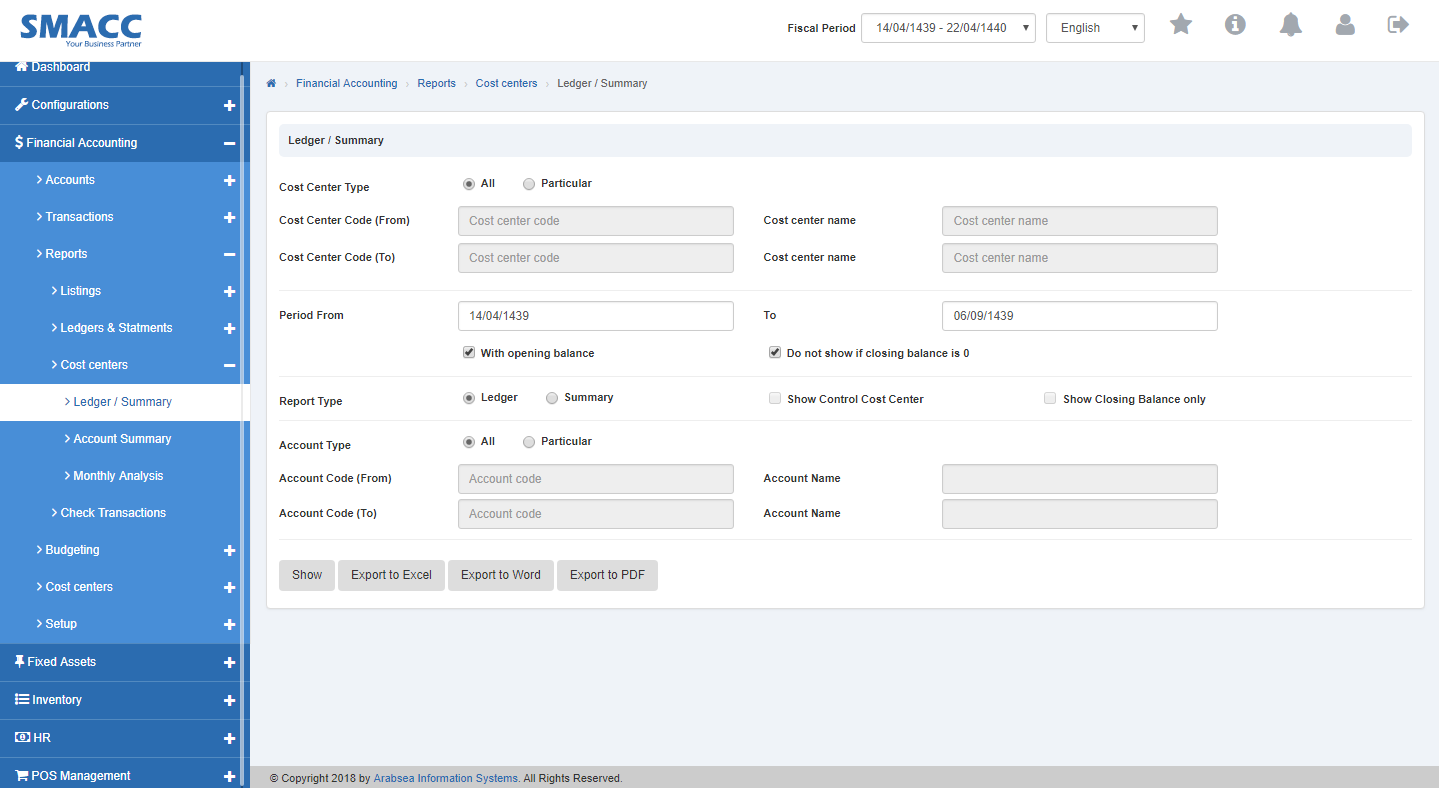 حدّد نوع مركز التكلفة (انقر على زر الاختيار «الكل» أو زر اختيار مركز محدد).
 انقر على حقل الإدخال «رمز مركز التكلفة من» فتنسدل قائمة رموز مراكز التكلفة. اختر رمز مركز التكلفة المطلوب، فيظهر اسم مركز التكلفة في حقل الإدخال «اسم مركز التكلفة».
 انقر على حقل الإدخال «رمز مركز التكلفة إلى» فتنسدل قائمة رموز مراكز التكلفة. اختر رمز مركز التكلفة المطلوب، فيظهر اسم مركز التكلفة في حقل الإدخال «رمز مركز التكلفة».
 أدخل تاريخ البداية في حقل الإدخال «الفترة من» وتاريخ النهاية في حقل الإدخال «الفترة إلى».
 حدّد نوع التقرير (انقر على زر اختيار «دفتر الأستاذ» أو زر اختيار «الملخص»)، ثم انقر على مربع الاختيار «عرض مركز التحكم».
 انقر على حقل الإدخال «رمز الحساب من» فتنسدل قائمة رموز الحسابات. اختر رمز الحساب المطلوب، فيظهر اسم الحساب في حقل الإدخال «اسم الحساب».
 انقر على حقل الإدخال «رمز الحساب إلى» فتنسدل قائمة رموز الحسابات. اختر رمز الحساب المطلوب، فيظهر اسم الحساب في حقل الإدخال «اسم الحساب».
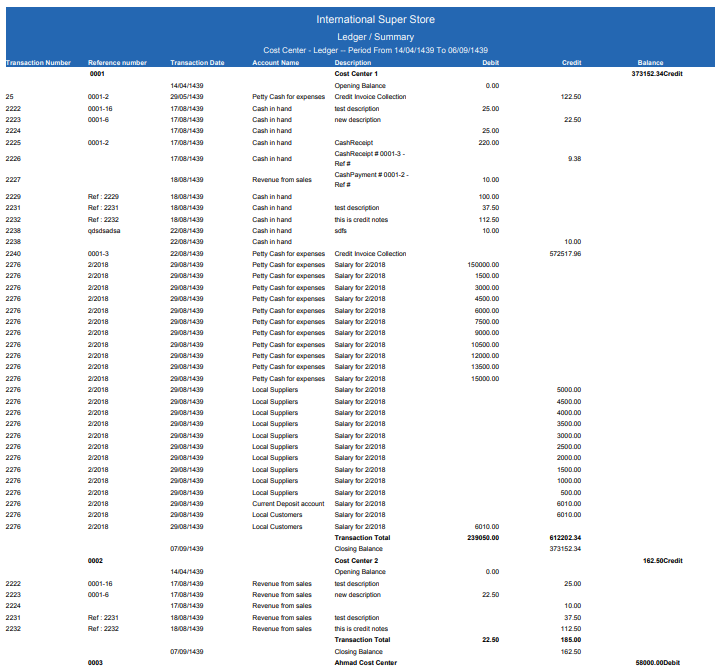
 انقر على زر «عرض» فيُعرَض دفتر الأستاذ/الملخص.
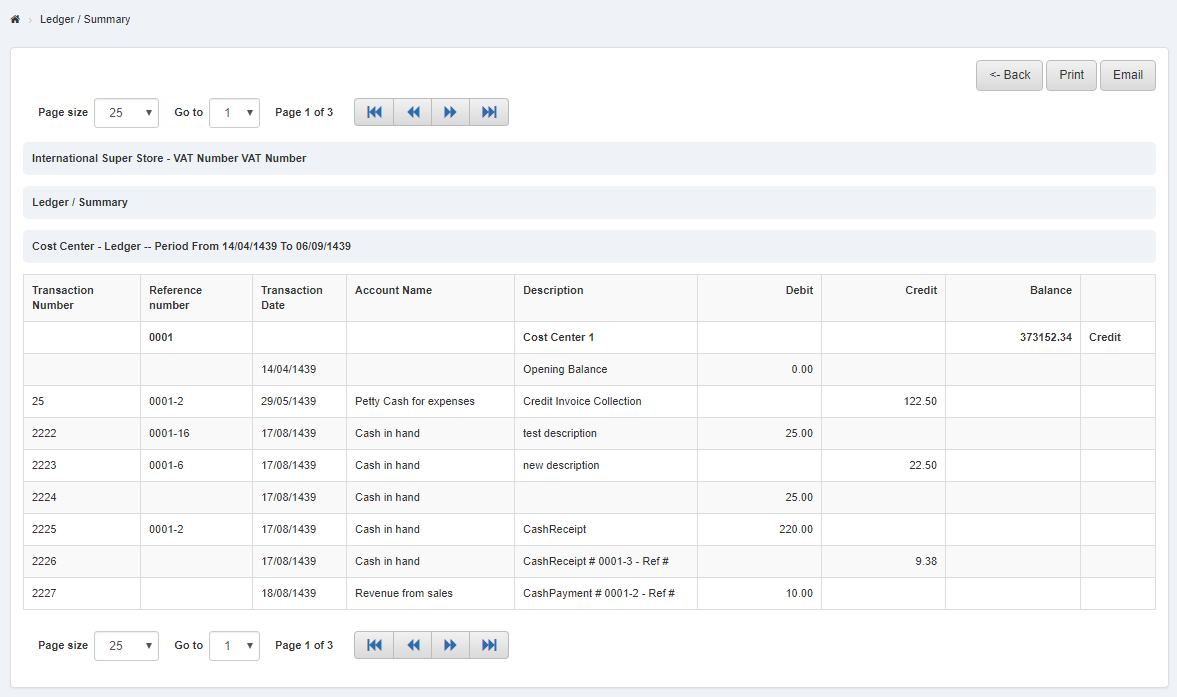
طباعة تقرير دفتر الأستاذ/الملخص
انقر على «المحاسبة المالية»، ثم «التقارير»، ثم «مركز التكلفة»، ثم «دفتر الأستاذ/الملخص». ستظهر صفحة دفتر الأستاذ/الملخص.
حدّد نوع مركز التكلفة (انقر على زر الاختيار «الكل» أو زر اختيار مركز محدد).
انقر على حقل الإدخال «رمز مركز التكلفة من» فتنسدل قائمة رموز مراكز التكلفة. اختر رمز مركز التكلفة المطلوب، فيظهر اسم مركز التكلفة في حقل الإدخال «اسم مركز التكلفة».
انقر على حقل الإدخال «رمز مركز التكلفة إلى» فتنسدل قائمة رموز مراكز التكلفة. اختر رمز مركز التكلفة المطلوب، فيظهر اسم مركز التكلفة في حقل الإدخال «رمز مركز التكلفة».
أدخل تاريخ البداية في حقل الإدخال «الفترة من» وتاريخ النهاية في حقل الإدخال «الفترة إلى».
حدّد نوع التقرير (انقر على زر اختيار «دفتر الأستاذ» أو زر اختيار «الملخص»)، ثم انقر على مربع الاختيار «عرض مركز التحكم».
انقر على حقل الإدخال «رمز الحساب من» فتنسدل قائمة رموز الحسابات. اختر رمز الحساب المطلوب، فيظهر اسم الحساب في حقل الإدخال «اسم الحساب».
انقر على حقل الإدخال «رمز الحساب إلى» فتنسدل قائمة رموز الحسابات. اختر رمز الحساب المطلوب، فيظهر اسم الحساب في حقل الإدخال «اسم الحساب».
انقر على زر «عرض» فيُعرَض دفتر الأستاذ/الملخص.
لطباعة الصفحة، حدّد الصفحة المطلوبة ثم انقر على زر «طباعة» في أعلى صفحة دفتر الأستاذ/الملخص، فيظهر مربع التأكيد.
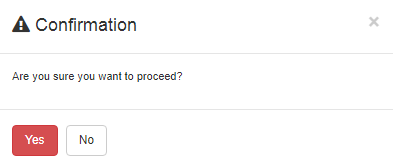 انقر على زر «نعم» لطباعة المعلومات.
تصدير تقرير دفتر الأستاذ/الملخص إلى Excel
انقر على «المحاسبة المالية»، ثم «التقارير»، ثم «مركز التكلفة»، ثم «دفتر الأستاذ/الملخص». ستظهر صفحة دفتر الأستاذ/الملخص.
حدّد نوع مركز التكلفة (انقر على زر الاختيار «الكل» أو زر اختيار مركز محدد).
انقر على حقل الإدخال «رمز مركز التكلفة من» فتنسدل قائمة رموز مراكز التكلفة. اختر رمز مركز التكلفة المطلوب، فيظهر اسم مركز التكلفة في حقل الإدخال «اسم مركز التكلفة».
انقر على حقل الإدخال «رمز مركز التكلفة إلى» فتنسدل قائمة رموز مراكز التكلفة. اختر رمز مركز التكلفة المطلوب، فيظهر اسم مركز التكلفة في حقل الإدخال «رمز مركز التكلفة».
أدخل تاريخ البداية في حقل الإدخال «الفترة من» وتاريخ النهاية في حقل الإدخال «الفترة إلى».
حدّد نوع التقرير (انقر على زر اختيار «دفتر الأستاذ» أو زر اختيار «الملخص»)، ثم انقر على مربع الاختيار «عرض مركز التحكم».
انقر على حقل الإدخال «رمز الحساب من» فتنسدل قائمة رموز الحسابات. اختر رمز الحساب المطلوب، فيظهر اسم الحساب في حقل الإدخال «اسم الحساب».
انقر على حقل الإدخال «رمز الحساب إلى» فتنسدل قائمة رموز الحسابات. اختر رمز الحساب المطلوب، فيظهر اسم الحساب في حقل الإدخال «اسم الحساب».
انقر على زر «عرض» فيُعرَض دفتر الأستاذ/الملخص.
انقر على زر «تصدير إلى Excel» فيُنزَّل دفتر الأستاذ/الملخص بصيغة Excel. انقر على صندوق الرسالة في أعلى زاوية الصفحة، فيُعرَض تقرير دفتر الأستاذ/الملخص بصيغة Excel.
تصدير تقرير دفتر الأستاذ/الملخص إلى Word
انقر على «المحاسبة المالية»، ثم «التقارير»، ثم «مركز التكلفة»، ثم «دفتر الأستاذ/الملخص». ستظهر صفحة دفتر الأستاذ/الملخص.
حدّد نوع مركز التكلفة (انقر على زر الاختيار «الكل» أو زر اختيار مركز محدد).
انقر على حقل الإدخال «رمز مركز التكلفة من» فتنسدل قائمة رموز مراكز التكلفة. اختر رمز مركز التكلفة المطلوب، فيظهر اسم مركز التكلفة في حقل الإدخال «اسم مركز التكلفة».
انقر على حقل الإدخال «رمز مركز التكلفة إلى» فتنسدل قائمة رموز مراكز التكلفة. اختر رمز مركز التكلفة المطلوب، فيظهر اسم مركز التكلفة في حقل الإدخال «رمز مركز التكلفة».
أدخل تاريخ البداية في حقل الإدخال «الفترة من» وتاريخ النهاية في حقل الإدخال «الفترة إلى».
حدّد نوع التقرير (انقر على زر اختيار «دفتر الأستاذ» أو زر اختيار «الملخص»)، ثم انقر على مربع الاختيار «عرض مركز التحكم».
انقر على حقل الإدخال «رمز الحساب من» فتنسدل قائمة رموز الحسابات. اختر رمز الحساب المطلوب، فيظهر اسم الحساب في حقل الإدخال «اسم الحساب».
انقر على حقل الإدخال «رمز الحساب إلى» فتنسدل قائمة رموز الحسابات. اختر رمز الحساب المطلوب، فيظهر اسم الحساب في حقل الإدخال «اسم الحساب».
انقر على زر «عرض» فيُعرَض دفتر الأستاذ/الملخص.
انقر على زر «تصدير إلى Word» فيُنزَّل دفتر الأستاذ/الملخص بصيغة Word. انقر على صندوق الرسالة في أعلى زاوية الصفحة، فيُعرَض تقرير دفتر الأستاذ/الملخص بصيغة Word.
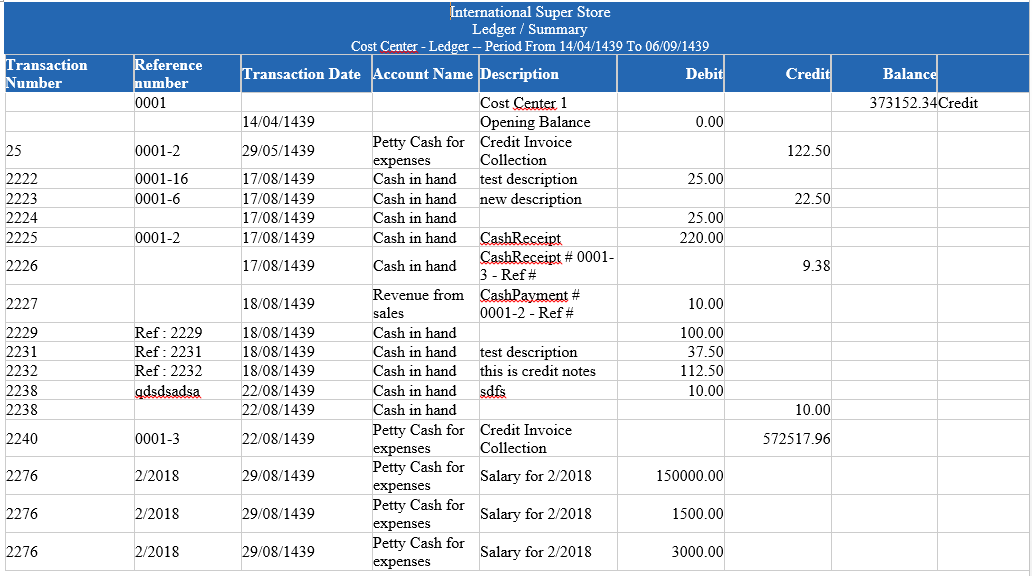
تصدير تقرير دفتر الأستاذ/الملخص إلى PDF
انقر على «المحاسبة المالية»، ثم «التقارير»، ثم «مركز التكلفة»، ثم «دفتر الأستاذ/الملخص». ستظهر صفحة دفتر الأستاذ/الملخص.
حدّد نوع مركز التكلفة (انقر على زر الاختيار «الكل» أو زر اختيار مركز محدد).
انقر على حقل الإدخال «رمز مركز التكلفة من» فتنسدل قائمة رموز مراكز التكلفة. اختر رمز مركز التكلفة المطلوب، فيظهر اسم مركز التكلفة في حقل الإدخال «اسم مركز التكلفة».
انقر على حقل الإدخال «رمز مركز التكلفة إلى» فتنسدل قائمة رموز مراكز التكلفة. اختر رمز مركز التكلفة المطلوب، فيظهر اسم مركز التكلفة في حقل الإدخال «رمز مركز التكلفة».
أدخل تاريخ البداية في حقل الإدخال «الفترة من» وتاريخ النهاية في حقل الإدخال «الفترة إلى».
حدّد نوع التقرير (انقر على زر اختيار «دفتر الأستاذ» أو زر اختيار «الملخص»)، ثم انقر على مربع الاختيار «عرض مركز التحكم».
انقر على حقل الإدخال «رمز الحساب من» فتنسدل قائمة رموز الحسابات. اختر رمز الحساب المطلوب، فيظهر اسم الحساب في حقل الإدخال «اسم الحساب».
انقر على حقل الإدخال «رمز الحساب إلى» فتنسدل قائمة رموز الحسابات. اختر رمز الحساب المطلوب، فيظهر اسم الحساب في حقل الإدخال «اسم الحساب».
انقر على زر «عرض» فيُعرَض دفتر الأستاذ/الملخص.
انقر على زر «تصدير إلى PDF» فيُنزَّل دفتر الأستاذ/الملخص بصيغة PDF. انقر على صندوق الرسالة في أعلى زاوية الصفحة، فيُعرَض تقرير دفتر الأستاذ/الملخص بصيغة PDF.
هل كان هذا المقال مفيداً؟
ابدأ مع SMACC اليوم
جرّب مجاناً لمدة 14 يوماً — بدون بطاقة ائتمان وبدون التزام.