
الأصناف المتحركة/غير المتحركة في المبيعات
تساعدك شاشة الأصناف المتحركة/غير المتحركة في المبيعات على عرض تقرير الأصناف المتحركة وغير المتحركة في المبيعات.
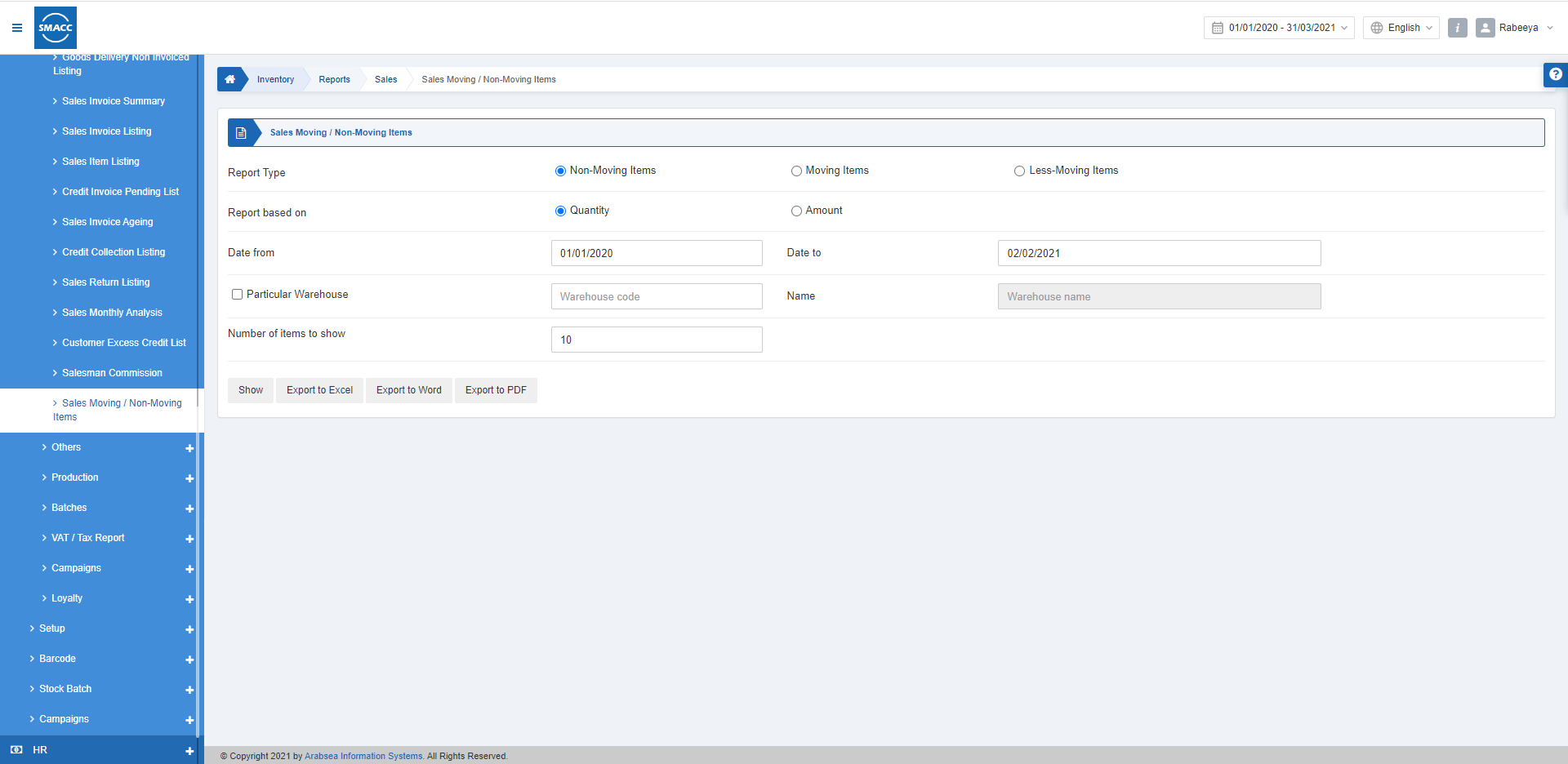
عرض الأصناف المتحركة/غير المتحركة في المبيعات
لعرض الأصناف المتحركة/غير المتحركة في المبيعات، انتقل إلى المخزون > التقارير > المبيعات > الأصناف المتحركة/غير المتحركة فتظهر الصفحة.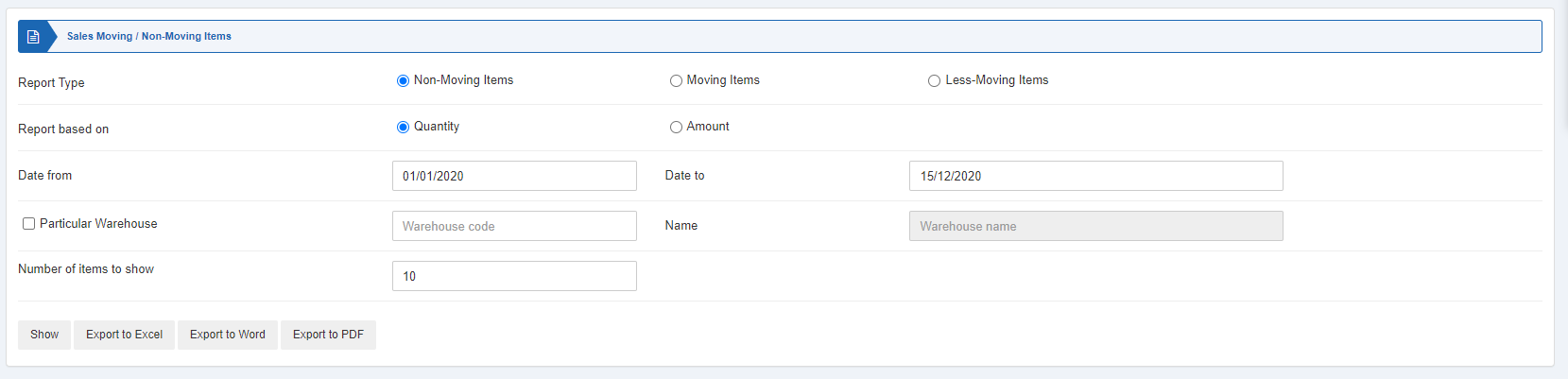 توجد ثلاثة أنواع من أزرار الاختيار، ويمكنك تحديد واحد منها في كل مرة.
 الأصناف غير المتحركة: وهي الأصناف التي لا توجد عليها عمليات بيع.
الأصناف المتحركة: وهي الأصناف ذات التكرار العالي في عمليات البيع.
الأصناف قليلة الحركة: وهي الأصناف ذات التكرار الأقل في عمليات البيع.
يوجد زرّا اختيار إضافيان ويمكنك تحديد واحد منهما في كل مرة.
الكمية: عند تحديد هذا الزر يُبنى التقرير على أساس كمية عملية البيع.
المبلغ: عند تحديد هذا الزر يُبنى التقرير على أساس مبلغ عملية البيع.
الأصناف غير المتحركة: وهي الأصناف التي لا توجد عليها عمليات بيع.
الأصناف المتحركة: وهي الأصناف ذات التكرار العالي في عمليات البيع.
الأصناف قليلة الحركة: وهي الأصناف ذات التكرار الأقل في عمليات البيع.
يوجد زرّا اختيار إضافيان ويمكنك تحديد واحد منهما في كل مرة.
الكمية: عند تحديد هذا الزر يُبنى التقرير على أساس كمية عملية البيع.
المبلغ: عند تحديد هذا الزر يُبنى التقرير على أساس مبلغ عملية البيع.

 التاريخ من: يحدد هذا الحقل تاريخ البداية للتقرير.
التاريخ إلى: يحدد هذا الحقل تاريخ النهاية للتقرير.
التاريخ من: يحدد هذا الحقل تاريخ البداية للتقرير.
التاريخ إلى: يحدد هذا الحقل تاريخ النهاية للتقرير.
 مستودع محدد: يتيح لك هذا الحقل تحديد رمز مستودع معيّن من القائمة المنسدلة.
 عدد الأصناف المراد عرضها: يحدد هذا الحقل عدد الأصناف المراد عرضها في التقرير.
 «عرض»: يعرض هذا الزر التقرير وفقًا للمرشحات المحددة.
«تصدير إلى Excel»: يتيح هذا الزر تصدير بيانات التقرير إلى Excel.
«تصدير إلى Word»: يتيح هذا الزر تصدير بيانات التقرير إلى Word.
«تصدير إلى PDF»: يتيح هذا الزر تصدير بيانات التقرير إلى PDF.
انقر على زر «عرض» لعرض التقرير.
«عرض»: يعرض هذا الزر التقرير وفقًا للمرشحات المحددة.
«تصدير إلى Excel»: يتيح هذا الزر تصدير بيانات التقرير إلى Excel.
«تصدير إلى Word»: يتيح هذا الزر تصدير بيانات التقرير إلى Word.
«تصدير إلى PDF»: يتيح هذا الزر تصدير بيانات التقرير إلى PDF.
انقر على زر «عرض» لعرض التقرير.
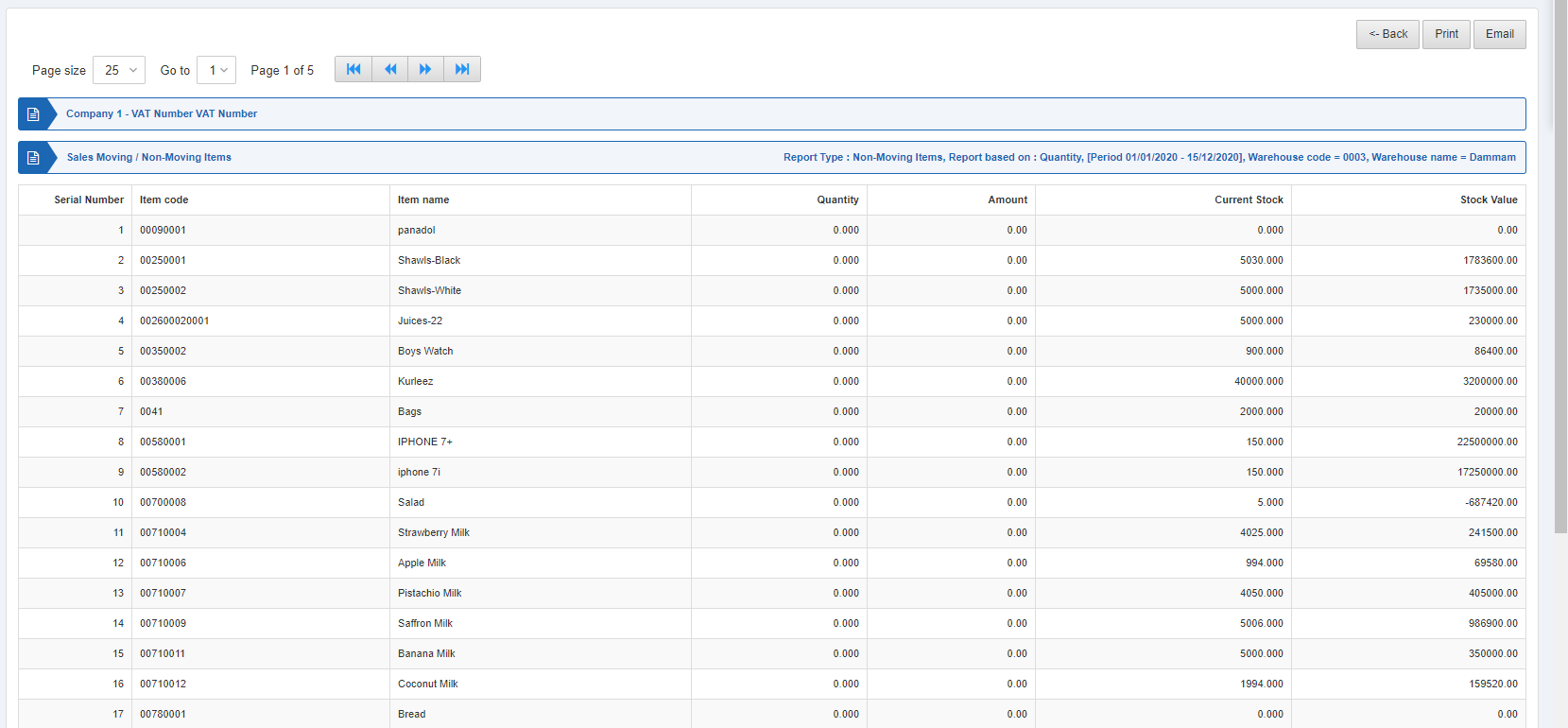 كما توجد أزرار للتنقل لعرض الصفحات.
 حجم الصفحة: يمكنك ضبط عدد السجلات في كل صفحة.
الانتقال إلى: يمكنك الانتقال إلى رقم الصفحة التي تريد عرضها.
حجم الصفحة: يمكنك ضبط عدد السجلات في كل صفحة.
الانتقال إلى: يمكنك الانتقال إلى رقم الصفحة التي تريد عرضها.
 يمكنك العودة إلى الصفحة السابقة أو طباعة التقرير أو إرساله بالبريد الإلكتروني.
هل كان هذا المقال مفيداً؟
ابدأ مع SMACC اليوم
جرّب مجاناً لمدة 14 يوماً — بدون بطاقة ائتمان وبدون التزام.