
قائمة بضائع التسليم غير المفوترة
يساعدك تقرير قائمة بضائع التسليم غير المفوترة على عرض تقرير قائمة إشعارات تسليم البضائع (GDN) غير المفوترة (التي لم تُصدَر لها فاتورة).
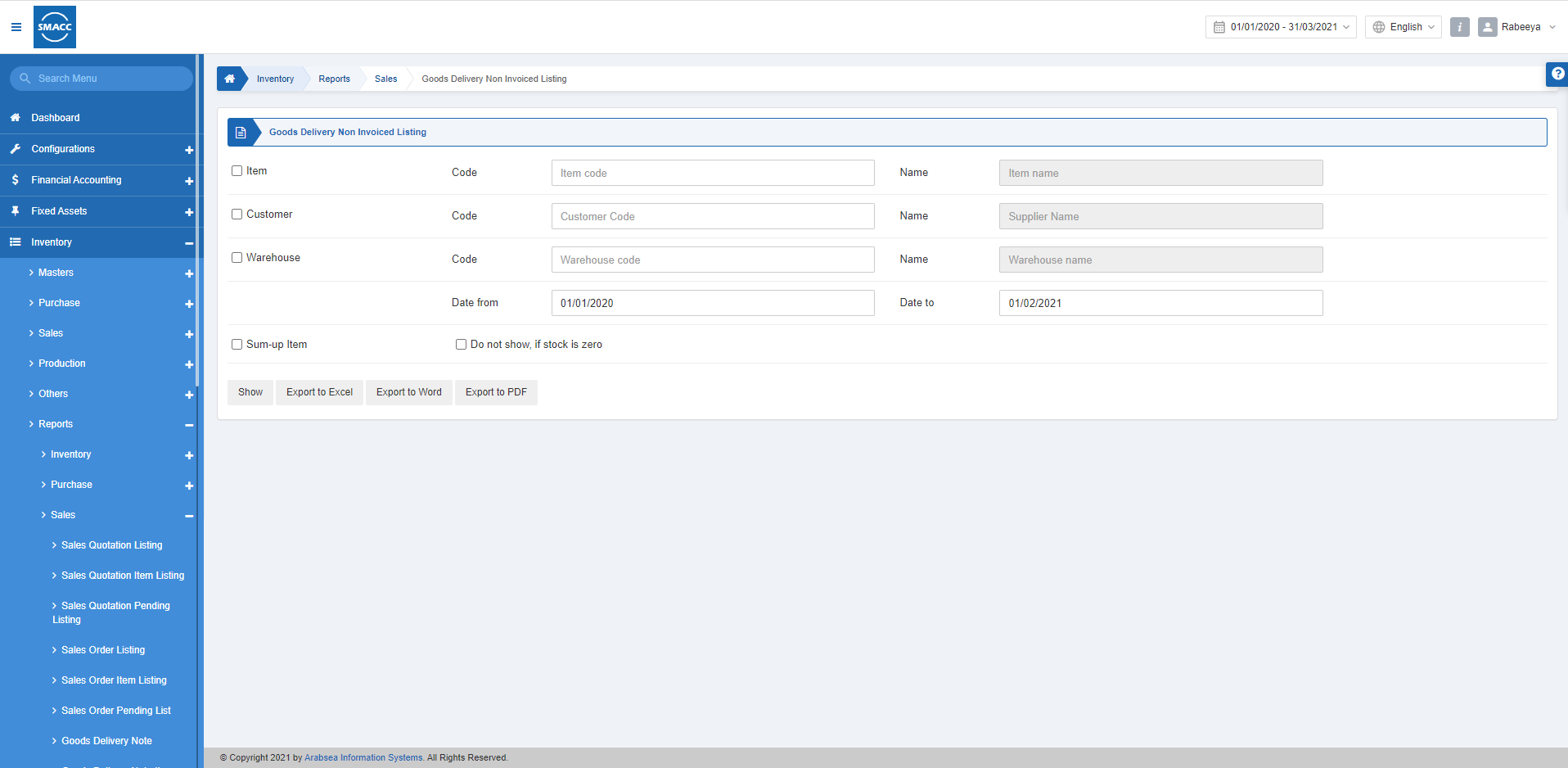
عرض قائمة بضائع التسليم غير المفوترة
لعرض قائمة بضائع التسليم غير المفوترة، انتقل إلى المخزون > التقارير > المبيعات > قائمة بضائع التسليم غير المفوترة، فتظهر صفحة قائمة بضائع التسليم غير المفوترة.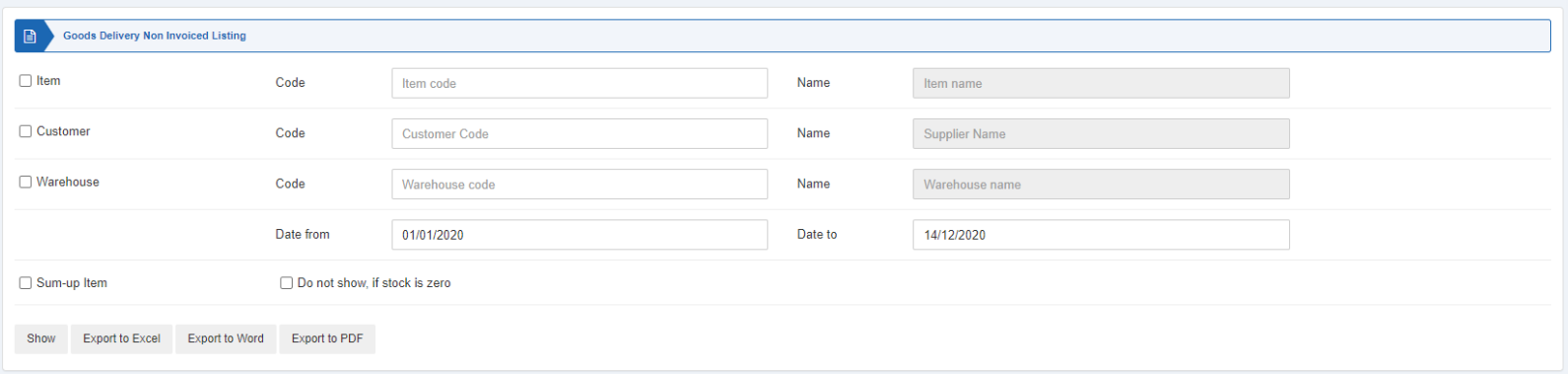 تتوفر في هذا التقرير ثلاثة أنواع من مربعات الاختيار تعمل كعوامل تصفية.
 «الصنف» (Item): يُفعَّل مربع الاختيار هذا لتحديد صنف معيّن. وإذا تُرك دون تفعيل فستُعرض جميع الأصناف مقابل العميل والمستودع.
«العميل» (Customer): يُفعَّل مربع الاختيار هذا لتحديد عميل معيّن. وإذا تُرك دون تفعيل فستُعرض جميع الأصناف مقابل الصنف والمستودع.
«المستودع» (Warehouse): يُفعَّل مربع الاختيار هذا لتحديد مستودع معيّن. وإذا تُرك دون تفعيل فستُعرض جميع الأصناف مقابل العميل والصنف.
«الصنف» (Item): يُفعَّل مربع الاختيار هذا لتحديد صنف معيّن. وإذا تُرك دون تفعيل فستُعرض جميع الأصناف مقابل العميل والمستودع.
«العميل» (Customer): يُفعَّل مربع الاختيار هذا لتحديد عميل معيّن. وإذا تُرك دون تفعيل فستُعرض جميع الأصناف مقابل الصنف والمستودع.
«المستودع» (Warehouse): يُفعَّل مربع الاختيار هذا لتحديد مستودع معيّن. وإذا تُرك دون تفعيل فستُعرض جميع الأصناف مقابل العميل والصنف.
 «التاريخ من» (Date from): يحدد هذا الحقل تاريخ بداية التقرير.
«التاريخ إلى» (Date to): يحدد هذا الحقل تاريخ نهاية التقرير.
«التاريخ من» (Date from): يحدد هذا الحقل تاريخ بداية التقرير.
«التاريخ إلى» (Date to): يحدد هذا الحقل تاريخ نهاية التقرير.
 «تجميع الصنف» (Sum-up Item): يتيح مربع الاختيار هذا تجميع الأصناف.
«عدم العرض إذا كان الرصيد صفراً» (Do not show, if stock is zero): يمنع مربع الاختيار هذا عرض التقرير إذا كان رصيد المخزون صفراً في المستودع.
«تجميع الصنف» (Sum-up Item): يتيح مربع الاختيار هذا تجميع الأصناف.
«عدم العرض إذا كان الرصيد صفراً» (Do not show, if stock is zero): يمنع مربع الاختيار هذا عرض التقرير إذا كان رصيد المخزون صفراً في المستودع.
 «عرض» (Show): يعرض هذا الزر التقرير وفقاً لعوامل التصفية المحددة.
«تصدير إلى Excel» (Export to Excel): يتيح هذا الزر تصدير بيانات التقرير إلى Excel.
«تصدير إلى Word» (Export to Word): يتيح هذا الزر تصدير بيانات التقرير إلى Word.
«تصدير إلى PDF» (Export to PDF): يتيح هذا الزر تصدير بيانات التقرير إلى PDF.
انقر على زر «عرض» لعرض التقرير.
«عرض» (Show): يعرض هذا الزر التقرير وفقاً لعوامل التصفية المحددة.
«تصدير إلى Excel» (Export to Excel): يتيح هذا الزر تصدير بيانات التقرير إلى Excel.
«تصدير إلى Word» (Export to Word): يتيح هذا الزر تصدير بيانات التقرير إلى Word.
«تصدير إلى PDF» (Export to PDF): يتيح هذا الزر تصدير بيانات التقرير إلى PDF.
انقر على زر «عرض» لعرض التقرير.
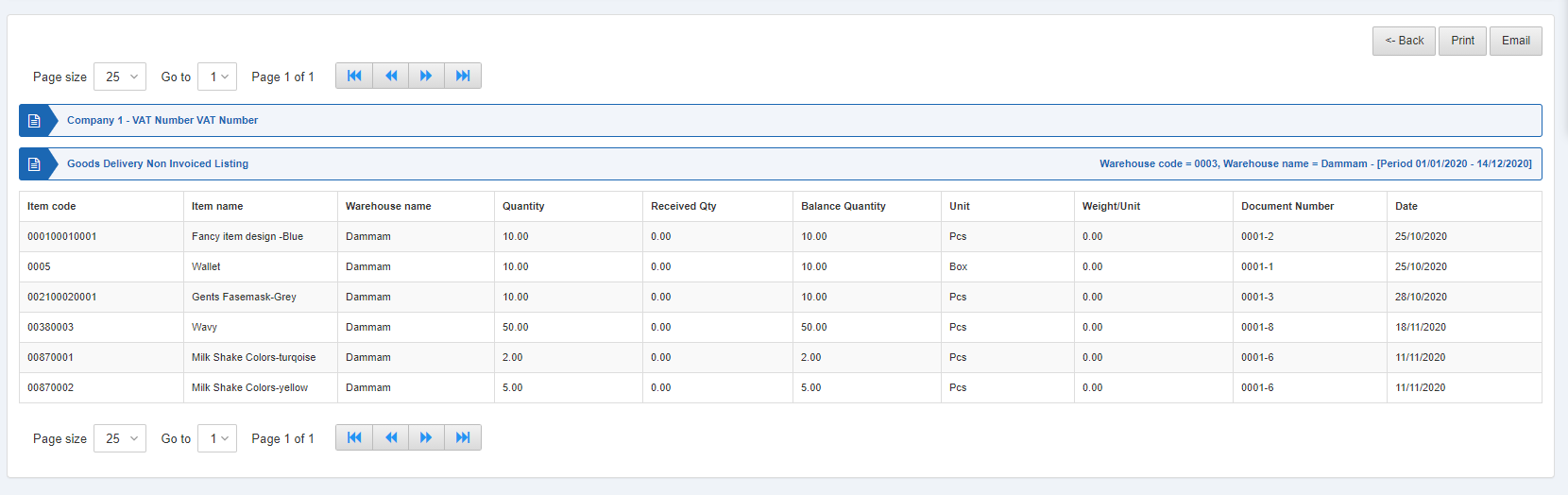 كما تتوفر أزرار التنقل لعرض الصفحات.
 «حجم الصفحة» (Page Size): يمكنك ضبط عدد السجلات في كل صفحة.
«الانتقال إلى» (Go to): يمكنك الانتقال إلى رقم الصفحة التي تريد عرضها.
«حجم الصفحة» (Page Size): يمكنك ضبط عدد السجلات في كل صفحة.
«الانتقال إلى» (Go to): يمكنك الانتقال إلى رقم الصفحة التي تريد عرضها.
 يمكنك العودة إلى الصفحة السابقة أو طباعة التقرير أو إرساله عبر البريد الإلكتروني.
هل كان هذا المقال مفيداً؟
ابدأ مع SMACC اليوم
جرّب مجاناً لمدة 14 يوماً — بدون بطاقة ائتمان وبدون التزام.