
التحليل الشهري للمبيعات
يساعدك تقرير التحليل الشهري للمبيعات على عرض التحليل الشهري لمبيعات الأصناف.
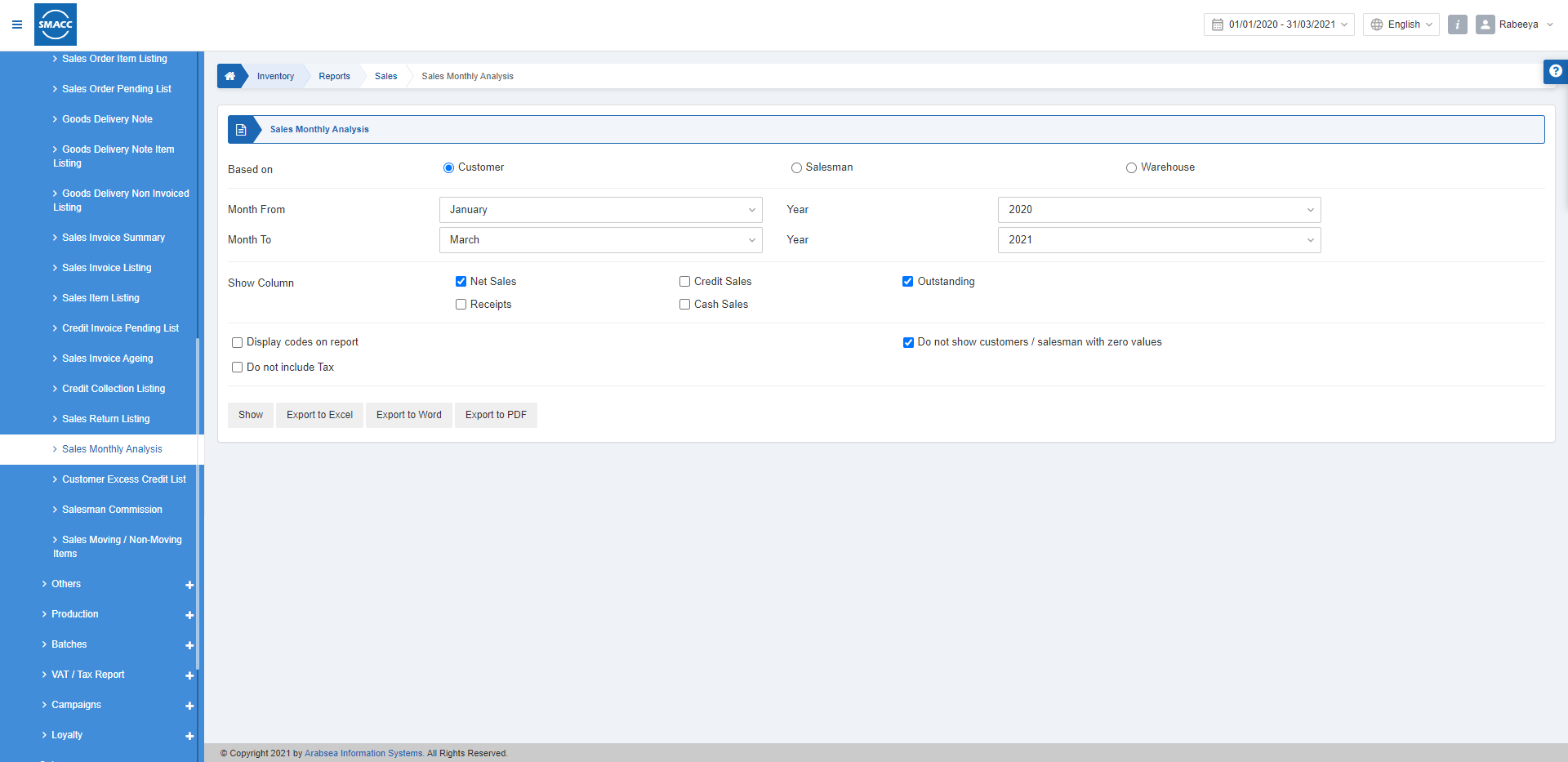
عرض التحليل الشهري للمبيعات
لعرض التحليل الشهري للمبيعات، انتقل إلى المخزون > التقارير > المبيعات > التحليل الشهري للمبيعات، فتظهر صفحة التحليل الشهري للمبيعات.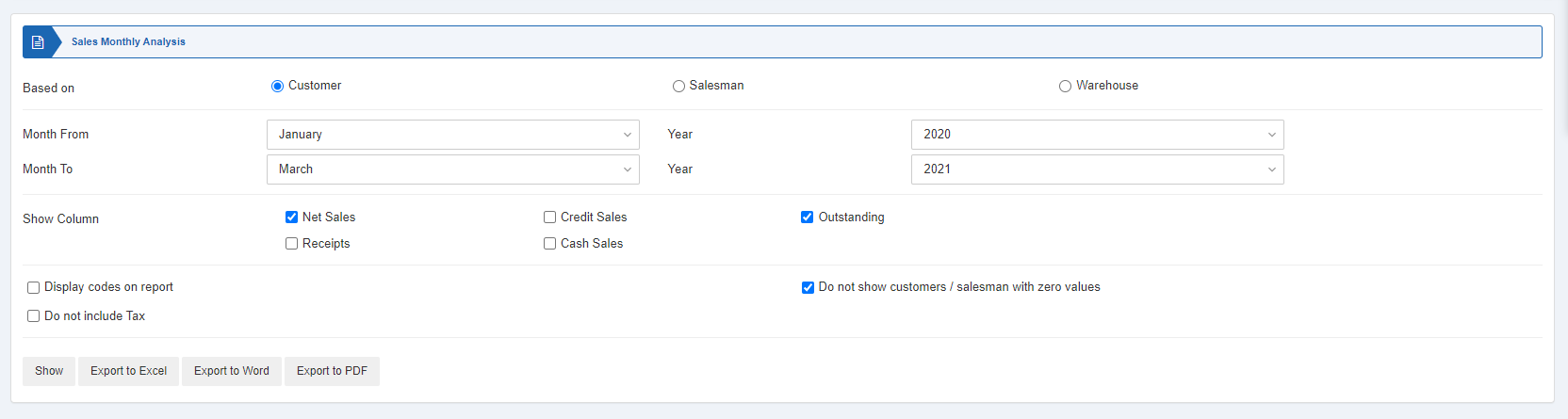
 تتوفر ثلاثة أزرار اختيار يمكنك من خلالها تحديد نوع التقرير.
- «العميل»
- «المندوب»
- «المستودع»
 «الشهر من»: يحدد هذا الحقل شهر بداية التقرير.
«السنة»: يحدد هذا الحقل سنة بداية التقرير.
«الشهر إلى»: يحدد هذا الحقل شهر نهاية التقرير.
«السنة»: يحدد هذا الحقل سنة نهاية التقرير.
«الشهر من»: يحدد هذا الحقل شهر بداية التقرير.
«السنة»: يحدد هذا الحقل سنة بداية التقرير.
«الشهر إلى»: يحدد هذا الحقل شهر نهاية التقرير.
«السنة»: يحدد هذا الحقل سنة نهاية التقرير.
 «عرض الأعمدة»: يمكنك تحديد مربعات الاختيار المطلوبة في تقريرك. وعند تحديد هذه المربعات، تظهر البيانات ذات الصلة في أعمدة التقرير.
تتوفر ثلاثة مربعات اختيار إضافية موضحة أدناه:
«عرض الأعمدة»: يمكنك تحديد مربعات الاختيار المطلوبة في تقريرك. وعند تحديد هذه المربعات، تظهر البيانات ذات الصلة في أعمدة التقرير.
تتوفر ثلاثة مربعات اختيار إضافية موضحة أدناه:
 «عرض الرموز في التقرير»: يتيح مربع الاختيار هذا عرض الرموز في التقرير.
«عدم عرض العملاء/المندوبين ذوي القيم الصفرية»: عند تحديد مربع الاختيار هذا، يتوقف التقرير عن عرض العملاء أو المندوبين ذوي القيم الصفرية.
«عدم تضمين الضريبة»: عند تحديد مربع الاختيار هذا، لا يعرض التقرير قيمة الضريبة ولا يتضمنها.
«عرض الرموز في التقرير»: يتيح مربع الاختيار هذا عرض الرموز في التقرير.
«عدم عرض العملاء/المندوبين ذوي القيم الصفرية»: عند تحديد مربع الاختيار هذا، يتوقف التقرير عن عرض العملاء أو المندوبين ذوي القيم الصفرية.
«عدم تضمين الضريبة»: عند تحديد مربع الاختيار هذا، لا يعرض التقرير قيمة الضريبة ولا يتضمنها.
 «عرض»: يعرض هذا الزر التقرير وفقًا للمرشحات المحددة.
«تصدير إلى Excel»: يتيح هذا الزر تصدير بيانات التقرير إلى Excel.
«تصدير إلى Word»: يتيح هذا الزر تصدير بيانات التقرير إلى Word.
«تصدير إلى PDF»: يتيح هذا الزر تصدير بيانات التقرير إلى PDF.
انقر على زر «عرض» لعرض التقرير.
«عرض»: يعرض هذا الزر التقرير وفقًا للمرشحات المحددة.
«تصدير إلى Excel»: يتيح هذا الزر تصدير بيانات التقرير إلى Excel.
«تصدير إلى Word»: يتيح هذا الزر تصدير بيانات التقرير إلى Word.
«تصدير إلى PDF»: يتيح هذا الزر تصدير بيانات التقرير إلى PDF.
انقر على زر «عرض» لعرض التقرير.
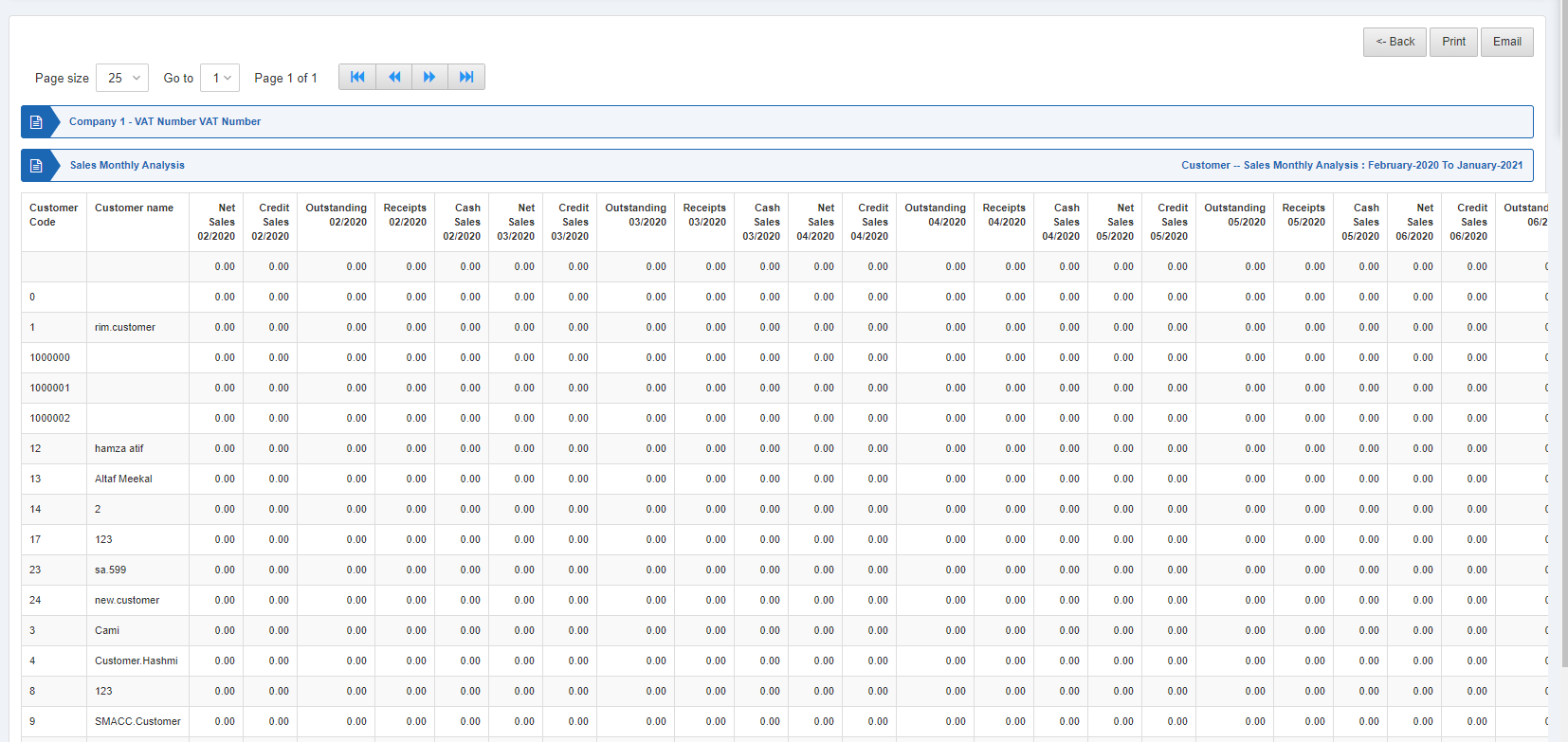 كما تتوفر أزرار التنقل لعرض الصفحات.
 «حجم الصفحة»: يمكنك ضبط عدد الإدخالات في كل صفحة.
«الانتقال إلى»: يمكنك الانتقال إلى رقم الصفحة التي تريد عرضها.
«حجم الصفحة»: يمكنك ضبط عدد الإدخالات في كل صفحة.
«الانتقال إلى»: يمكنك الانتقال إلى رقم الصفحة التي تريد عرضها.
 يمكنك العودة إلى الصفحة السابقة أو طباعة التقرير أو إرساله عبر البريد الإلكتروني.
هل كان هذا المقال مفيداً؟
ابدأ مع SMACC اليوم
جرّب مجاناً لمدة 14 يوماً — بدون بطاقة ائتمان وبدون التزام.