
تقرير مخزون عملية الإنتاج
يساعدك تقرير مخزون عملية الإنتاج على عرض تقرير عملية الإنتاج والمخزون الخاص بها.
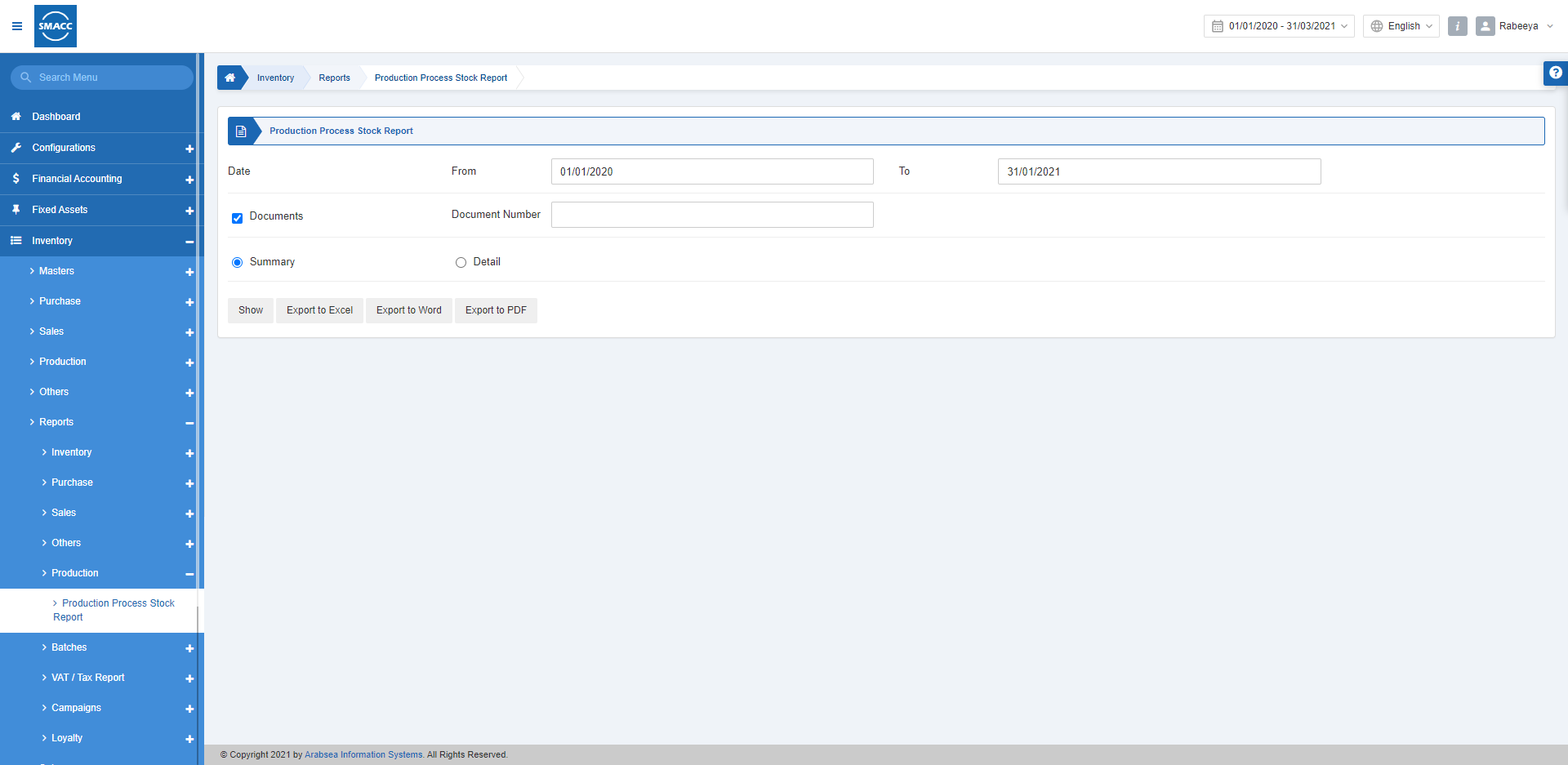
عرض تقرير مخزون عملية الإنتاج
لعرض تقرير مخزون عملية الإنتاج، انتقل إلى المخزون > التقارير > التصنيع والإنتاج > تقرير مخزون عملية الإنتاج، فتظهر صفحة تقرير مخزون عملية الإنتاج. يمكنك تحديد الفترة من/إلى للتقرير الخاص بك.

 «Documents»: يتم تحديد مربع الاختيار هذا للبحث في هذا التقرير من خلال رقم مستند معيّن.
 «Summary»: يعرض زر الاختيار هذا عند تحديده عرضًا مختصرًا للتقرير.
«Detail»: يعرض زر الاختيار هذا عند تحديده عرضًا مفصّلًا للتقرير.
«Summary»: يعرض زر الاختيار هذا عند تحديده عرضًا مختصرًا للتقرير.
«Detail»: يعرض زر الاختيار هذا عند تحديده عرضًا مفصّلًا للتقرير.
 «Show»: يعرض هذا الزر التقرير وفقًا للمرشحات المحددة.
«Export to Excel»: يتيح هذا الزر تصدير بيانات التقرير إلى Excel.
«Export to Word»: يتيح هذا الزر تصدير بيانات التقرير إلى Word.
«Export to PDF»: يتيح هذا الزر تصدير بيانات التقرير إلى PDF.
انقر على زر «Show» لعرض التقرير.
«Show»: يعرض هذا الزر التقرير وفقًا للمرشحات المحددة.
«Export to Excel»: يتيح هذا الزر تصدير بيانات التقرير إلى Excel.
«Export to Word»: يتيح هذا الزر تصدير بيانات التقرير إلى Word.
«Export to PDF»: يتيح هذا الزر تصدير بيانات التقرير إلى PDF.
انقر على زر «Show» لعرض التقرير.
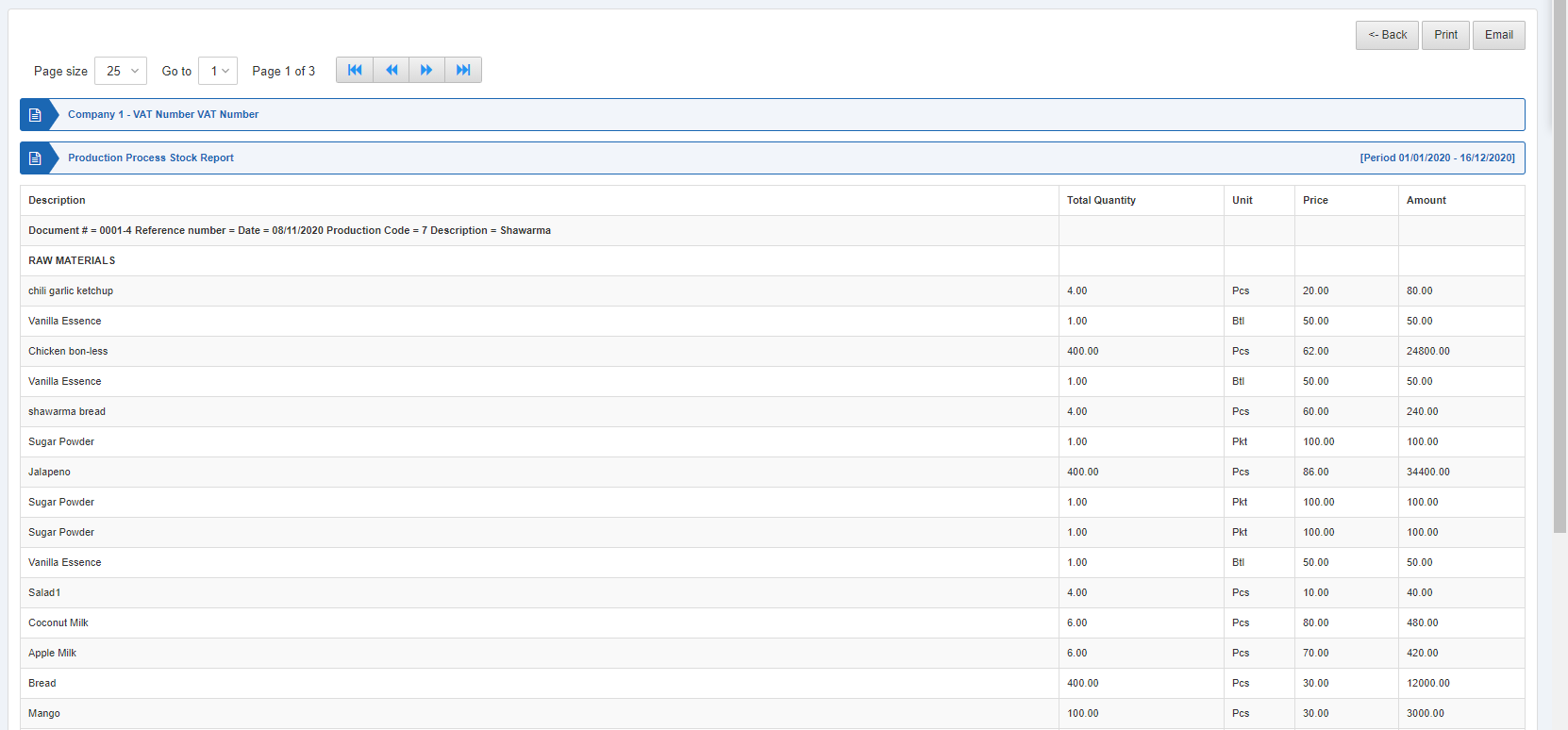 كما تتوفر أزرار التنقل الخاصة بعرض الصفحة.
 «Page Size»: يمكنك ضبط عدد الإدخالات في كل صفحة.
«Go to»: يمكنك الانتقال إلى رقم الصفحة التي تريد عرضها.
«Page Size»: يمكنك ضبط عدد الإدخالات في كل صفحة.
«Go to»: يمكنك الانتقال إلى رقم الصفحة التي تريد عرضها.
 يمكنك العودة إلى الصفحة السابقة أو طباعة التقرير أو إرساله عبر البريد الإلكتروني.
هل كان هذا المقال مفيداً؟
ابدأ مع SMACC اليوم
جرّب مجاناً لمدة 14 يوماً — بدون بطاقة ائتمان وبدون التزام.